

A CMMS (Computerized Maintenance Management System) is software that centralizes maintenance operations such as work orders, asset tracking, and scheduling. It helps organizations improve efficiency, reduce downtime, and gain real-time visibility by replacing manual processes with structured and automated workflows.
TL;DR
A CMMS, or Computerized Maintenance Management System, is a software platform designed to plan, monitor, and optimize maintenance operations across facilities, assets, and teams.
It enables organizations to:
A CMMS acts as a centralized system where all maintenance data is stored and accessed in real time.
Modern CMMS platforms also automate workflows, integrate with enterprise systems, and provide real-time visibility across operations.
In practice, this means organizations can shift from reactive maintenance to structured, data-driven operations.
Organizations adopt a CMMS when operational complexity becomes unmanageable with manual processes.
Work Order Chaos
Maintenance requests often come from multiple disconnected channels such as emails, calls, and spreadsheets.
This creates:
A CMMS centralizes all requests into structured workflows, ensuring every task is tracked and completed.
Vendor Mismanagement and Compliance Risks
Facility teams managing large subcontractor networks often lack:
A CMMS introduces structured vendor management, ensuring compliance and accountability.
No Visibility Across Locations
Multi-location businesses struggle with fragmented data and delayed reporting.
A CMMS provides centralized dashboards that offer real-time visibility across all locations.
Delayed Billing and Revenue Leakage
Without integration between operations and finance:
A modern CMMS connects work orders directly to billing workflows, improving cash flow.
A CMMS digitizes the full lifecycle of maintenance operations.
Step 1: Request Creation
A maintenance request is logged by a client, location, or internal team
Step 2: Work Order Generation
The system converts the request into a structured work order
Step 3: Dispatch and Assignment
Tasks are assigned to technicians or subcontractors
Step 4: Execution
Technicians complete work using mobile tools and capture real-time data
Step 5: Verification
Work is reviewed and approved
Step 6: Billing and Reporting
Invoices are generated and performance is tracked
This structured workflow improves accountability, efficiency, and transparency across operations.
Core Features of a Modern CMMS
A CMMS serves as an operational backbone for maintenance teams.
Work Order Management
CMMS platforms automate work order creation, tracking, and completion, improving efficiency and accountability.
Vendor and Subcontractor Management
Organizations can onboard vendors, track compliance, and monitor performance across locations.
Asset Management
CMMS systems maintain complete asset histories and support preventive maintenance scheduling, which helps extend asset life and reduce failures.
Mobile Access for Technicians
Technicians can access work orders, update progress, and capture data in real time using mobile devices, improving productivity.
Reporting and Analytics
CMMS platforms provide dashboards and insights that help organizations track performance and optimize operations.
Billing and Financial Integration
Modern CMMS tools integrate with financial systems to automate invoicing and accelerate revenue cycles.
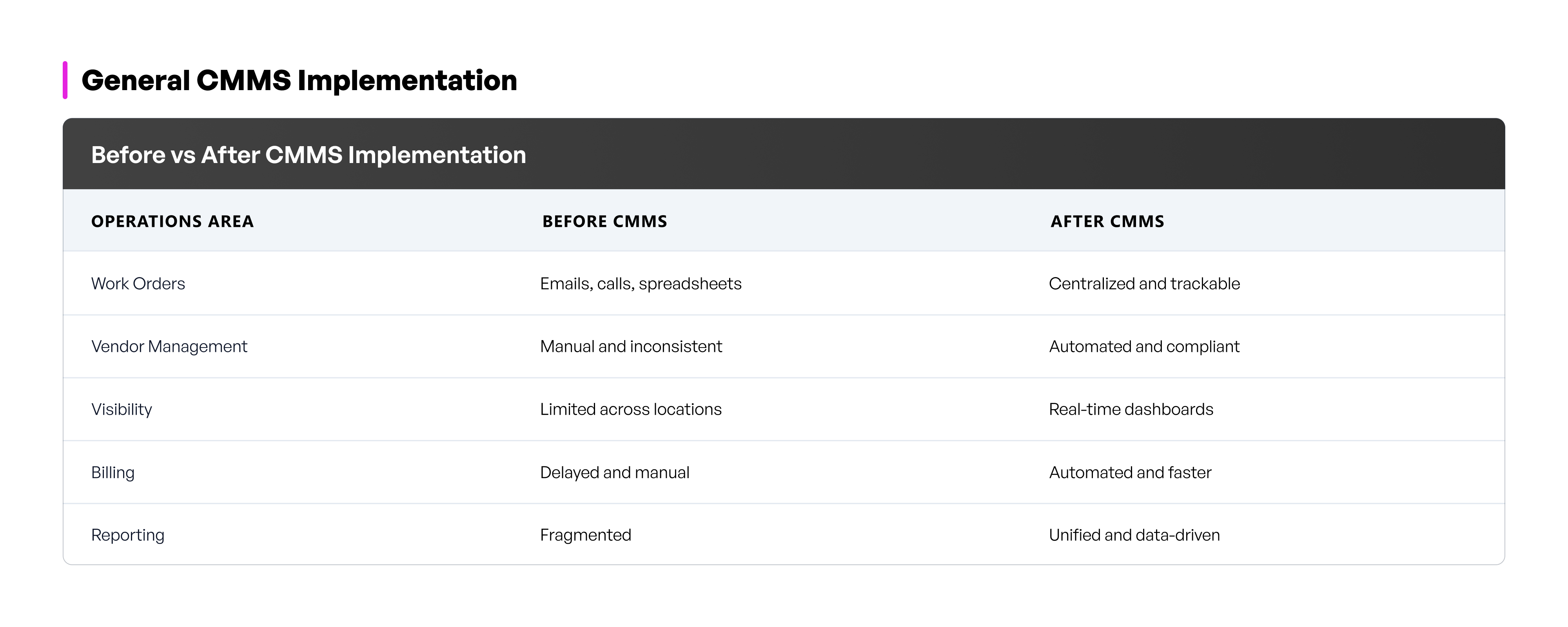
A CMMS delivers measurable improvements in efficiency and cost control.
Key Benefits

Consider a retail or restaurant chain with over 100 locations.
Without a CMMS:
With a modern CMMS:
Platforms like MyWork are designed specifically for this environment.
They connect:
This creates one platform connecting work orders, vendors, assets, and reporting across every location.
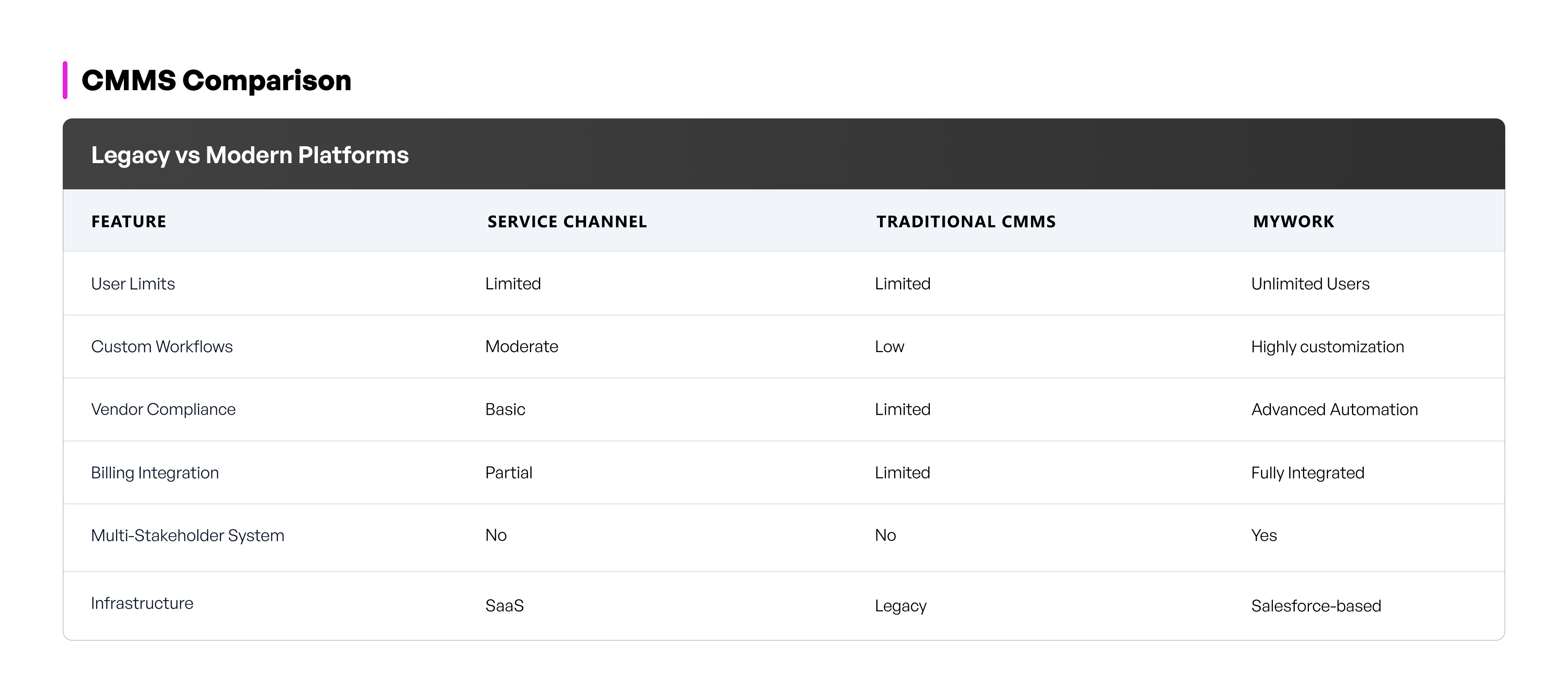
Traditional CMMS tools were built for simpler maintenance environments.
They often lack:
They solve maintenance tracking but do not address operational complexity.
Modern CMMS platforms function as a system of record for facility operations.
They:
Platforms like MyWork are built by facility service operators and designed for real-world complexity, particularly in vendor-heavy and multi-location environments.
Implementation Timeline
Most CMMS implementations take between 4 and 12 weeks.
Phase 1: Setup
Workflow configuration and system customization
Phase 2: Onboarding
Vendor and asset data migration
Phase 3: Training
Team onboarding and pilot rollout
Phase 4: Optimization
Continuous improvements and reporting enhancements
How to Choose the Right CMMS
When evaluating a CMMS, consider:
If a system cannot support these, it is likely outdated.
A CMMS is no longer just a maintenance tool. It is a strategic platform that enables operational efficiency, cost control, and scalability.
It replaces disconnected tools such as emails and spreadsheets with a unified system.
The most effective platforms provide one system connecting work orders, vendors, assets, and reporting across every location.
Platforms like MyWork help facility teams centralize operations, automate workflows, and gain real-time visibility without relying on fragmented systems.
What is a CMMS
A CMMS is software used to manage maintenance operations, including work orders, assets, and scheduling, in a centralized system.
How does a CMMS improve efficiency
It automates workflows, centralizes data, and provides real-time visibility, helping teams reduce manual work and improve decision-making.
What industries use CMMS
Industries such as manufacturing, retail, food and beverage, grocery, healthcare, and facility management use CMMS to manage maintenance operations efficiently.
How long does it take to implement a CMMS
Most implementations take between 4 and 12 weeks depending on the complexity of operations
Is CMMS suitable for multi-location businesses
Yes, modern CMMS platforms are designed to manage multiple locations, vendors, and assets in a centralized system
Explore our latest articles, guides, and industry updates designed to help you grow smarter and scale faster.




.png)