One missed work order in a 10-location operation might seem like an inconvenience. The same gap across 100 locations is a budget problem, a compliance risk, and a service provider accountability breakdown happening simultaneously. The reason most multi-site facility teams struggle with this is not a lack of effort. It is a lack of infrastructure. The work order system is where intention either becomes execution or falls apart entirely.
If you manage maintenance across 10 or more locations, you have likely experienced what poor work order management looks like at scale. Requests submitted by phone or email that never get properly assigned, or with proper details. Service providers showing up without the right information or asset history. The same piece of equipment broke repeatedly because the first repair was never closed and documented properly. Budget surprises at the end of the quarter because nobody had visibility into what was spent where.
This guide explains what work order management means for multi-site facility operations, how a CMMS transforms the work order lifecycle, and what to look for in a platform that scales. Everything here draws from myWork's experience processing 10M+ work orders across 190,000+ North American locations.
A work order is a structured record of a maintenance task. At minimum, it captures what needs to be done, where, on which asset, at what priority level, by whom, and by when. A complete work order system captures all of that, plus the execution details, documentation, and billing that follow after the task is complete.
The work order is the atomic unit of facility management. Every preventive maintenance plan generates work orders. Every reactive repair starts with a work order. Every service provider invoice should be reconciled against a work order. When work orders are managed well, facility operations have structure, visibility, and accountability. When they are not, everything else downstream tends to suffer.
What a properly executed work order contains from start to finish:
Key Insight: The work order is not just a task record. It is the legal and operational document that proves maintenance was performed, on what asset, by whom, on what date, and to what standard. Audit readiness is largely determined by the quality of work order records.

The problems that multi-site facility teams face with work orders are predictable. They tend to show up at roughly the same scale thresholds and get worse as the operation grows.
Fragmented submission channels: When work requests come in through email, phone, text message, and verbal conversation, there is often no single system of record. Requests can be partially complete, get lost, duplicated, or misrouted. The facility director may have no practical way to know what is open, what is overdue, or what is pending without making calls or waiting for reports.
No asset context at dispatch: When a technician is dispatched without access to the asset's full service history, they may arrive unprepared. They might not know that the same equipment has failed three times in the past six months, or that a specific part has been on backorder. The result is often lower first-time fix rates and more return visits.
Manual documentation after the fact: When technicians complete work on paper or in text messages, the documentation typically has to be re-entered manually before it is useful. This takes time, introduces errors, and often does not happen at all. The audit trail can be incomplete before it starts.
Disconnected invoicing: When service provider invoices arrive separately from the work orders they correspond to, reconciliation becomes a manual process. Invoices can get paid without verification against the work performed. Disputes may take days or weeks to resolve.
No visibility into service provider performance: Without a unified system, it can be difficult to know which service providers are consistently completing work on time, which ones have high first-time fix rates, and which ones are underperforming against SLAs. The data often exists in scattered emails and spreadsheets that nobody has time to analyze.
.png)
myWork Enterprise matters because the work order is not a standalone record in isolation. It is connected to the CRM, the asset registry, the dispatch system, the mobile app, myWork Supply for procurement, and the billing workflow, all in one data model without custom integrations.
Here is how a work order moves through the full lifecycle on myWork:
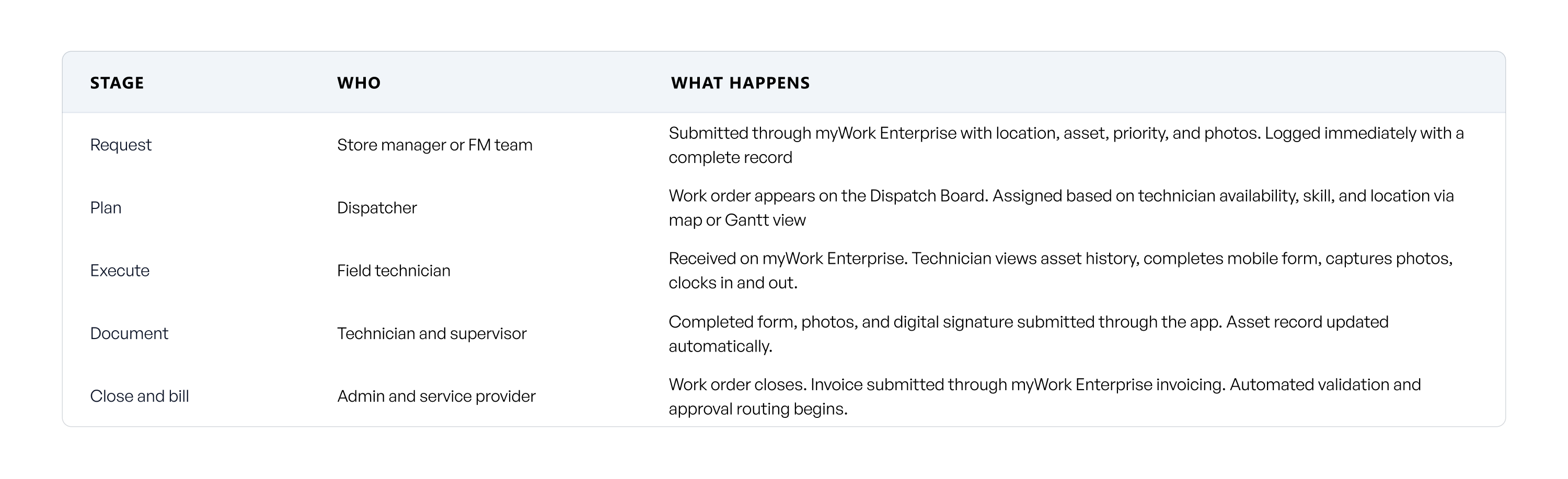
Request: A store manager or facility team member submits a maintenance request through myWork Enterprise's client-facing portal. The request captures location, asset, priority level, and any supporting photos or notes.
Dispatch: The work order is routed to the Dispatch Board within myWork Enterprise. The dispatcher sees a real-time map and Gantt view of all open jobs, available technicians, and contractor assignments.
Execution: The assigned technician receives the work order through myWork Enterprise on their mobile device, with full offline capability. They clock in, access the asset's service history, complete the required mobile form, capture photos, and collect a signature on completion. This works in basements, large sites, and anywhere the signal is poor.
Completion and documentation: The completed work order automatically updates the asset record, logs the service history, and triggers the invoice workflow. Photos, notes, and asset history updates are all captured and timestamped.
Billing: Service providers submit invoices through myWork Enterprise's invoicing workflow. Automated approvals validate them against the work order, route for approval, and integrate with accounting systems.
The offline mobile capability within myWork Enterprise is worth calling out specifically. For building service contractors whose technicians regularly work in low-connectivity environments, this is not a minor feature. It is often the difference between documentation getting captured in real time and it not getting captured at all.
Common Mistake: Selecting a CMMS based on the web interface without evaluating the mobile experience for field technicians and service providers. The quality of work order execution and documentation depends heavily on the field tool, not just the desktop dashboard.
The work order lifecycle is consistent across industries. What changes is the compliance requirements, the documentation standards, and the service category mix.
Retail chains and QSR operators such as Wendy's and Honeygrow manage high volumes of repeat work orders across large location counts. Brand consistency requires that every location receives the same service standard. Standardized mobile inspection forms, PM plans tied to equipment type across the portfolio, and real-time completion visibility are the core requirements. myWork Enterprise allows forms to be customized per service type and deployed across every location simultaneously.
CRE operators like a large, fast-growing mixed-use real estate owner-operator and Cushman & Wakefield manage mixed-use portfolios where the asset mix, tenant mix, and compliance requirements vary by property. Work order management needs to handle multi-tier asset hierarchies, tenant-facing service request portals, and long-term asset lifecycle reporting for capital planning. myWork Enterprise gives tenants and property managers a self-service portal for submitting requests and tracking status.
Healthcare facilities and public buildings carry the strictest compliance requirements. Every maintenance task must be fully documented. Work orders in these environments require complete audit trails, including who performed the work, what was done, what parts were used, and what the outcome was. myWork Enterprise captures all of this automatically through its mobile workflow, with no manual re-entry required.
BSC firms managing crews across multiple client sites need work order management from the contractor side. myWork Enterprise gives technicians their full schedule, job details, asset history, and documentation tools. The invoicing workflow automates invoice submission and approval so contractors get paid faster. For the 73,000+ BSCs using myWork Connect, this replaces fragmented coordination, paper forms, and email invoicing with a professional platform that works for both sides of the relationship.
When you evaluate CMMS platforms on their work order capabilities, these are the dimensions that separate platforms that scale from ones that create new bottlenecks at volume.
myWork combines all six through myWork Enterprise and myWork Supply, in one connected operating model that unifies facility teams, service providers, work orders, assets, procurement, and reporting into an operational truth.
The ROI of structured work order management comes from operational efficiency, and compliance risk reduction across every location in your portfolio.
Work order management is not a back-office function. It is the operational foundation of everything a facility team does. When it works well, maintenance is planned, documented, executed, and billed correctly across every location. When it does not, everything downstream can suffer from asset health to service provider accountability to compliance readiness to budget control.
myWork Enterprise incorporated with myWork Supply, gives facility teams and their building service contractors the infrastructure to own the work properly at scale. Across 10M+ work orders and 190,000+ locations, the platform has been tested across every vertical mywork serves.
If you want to see what structured work order management looks like in practice for your portfolio, schedule a demo at https://www.mywork.one/.
What is a work order in facility management?
A work order is a structured record of a maintenance task that captures the location, asset, priority, assignment, scope of work, execution documentation, and billing details in one system. It is the primary unit of accountability in facility operations, linking the request for service to the completion of that service and the invoice for it.
What are the benefits of structured work order management for multi-site operators?
The primary benefits typically include improved operational visibility across all locations, higher first-time fix rates from better technician and service provider preparation, complete audit-ready documentation captured automatically at each job, faster invoice processing through automated billing workflows, and better service provider performance data to drive accountability across the portfolio.
Which industries benefit most from structured work order management?
Retail and QSR chains, restaurants, commercial real estate portfolios, healthcare facilities, and building service contractors see the highest operational and compliance impact. These are environments with high work order volume, large service provider networks, and strict documentation requirements. Companies including Wendy's, Honeygrow, and Cushman & Wakefield manage these programs on myWork.
How long does it take to implement a work order management system?
Structured implementations commonly take 30 - 90 days, depending on data readiness, integrations, workflow complexity, training, and rollout scope. Core workflows can go live faster when the platform fits the operating model and the implementation is well prepared. A large, fast-growing mixed-use real estate owner-operator was fully operational on myWork within 30 days, which reflects what is achievable when the platform fits the operational model closely.
Can a work order system support field technicians without connectivity?
Yes, when the mobile tool is built for offline use. myWork Enterprise works fully offline, meaning technicians can receive work orders, access asset history, complete inspection forms, capture photos, and collect signatures without a data connection. This is important for technicians working in basements, large industrial sites, or anywhere signal is unreliable.
Does myWork support both facility managers and building service contractors in one platform?
Yes. Facility managers use myWork Enterprise to manage work order programs, dispatch, and reporting. Contractors receive and execute work through myWork Enterprise and submit invoices through the integrated billing workflow. Both sides operate in the same system with a shared work order record, helping eliminate the communication gaps.